// wBLOZ ON BNB SMART CHAIN

Buy BLOZ (wBLOZ)

BLOZ is the native coin of the Block Zero chain (mining, wallet); wBLOZ is its BEP-20 version on BNB Smart Chain, made for trading on PancakeSwap. The two are exchangeable 1:1 through the bridge.

wBLOZ is the BEP-20 version of BLOZ on BNB Smart Chain (BSC). The main market is PancakeSwap, where the liquidity sits. You can also swap for it inside MetaMask with the built-in swap, from any token you hold (USDT, BNB and others). Chart and trades are tracked on GeckoTerminal and the CoinMarketCap DEX page; these are data pages, not places to buy. This page shows how, step by step.

Read this first

  • Liquidity is very small. Prices can move a lot with a single trade, and you may not be able to sell at the price you see.
  • Check the price impact and slippage before you confirm every swap, and start with a small test amount.
  • Only use money you can afford to lose. Nothing here is a price or profit promise, and it is not investment advice.

Official contract address

Network: BNB Smart Chain (BEP-20) · Symbol: wBLOZ · Decimals: 8. Compare every character, anyone can create a token with the same name.

0x395B11E87ac0630aF9DC32520f411dB17C13F24C

wBLOZ and native BLOZ are the same coin in two forms: you can convert between them on the bridge. Native BLOZ is what the wallet and mining use.

Live DEX price: … USDT (indicative, third-party data).

// STEP BY STEP

Buy wBLOZ with MetaMask

  1. 1

    Switch to BNB Smart Chain

    Open MetaMask and select the BNB Smart Chain network. You need USDT (BEP-20) or a little BNB on that network. Keep a small amount of BNB for network fees.

  2. 2

    Open Swap and pick USDT

    Tap Swap. As the token you pay with, choose USDT (or BNB).
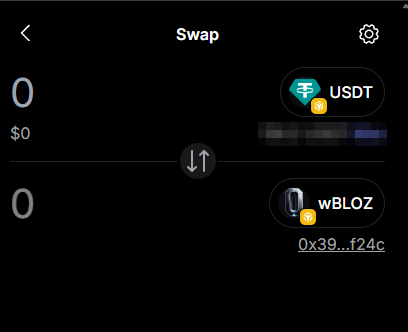
    MetaMask swap screen with USDT as the paying token and wBLOZ as the target token
  3. 3

    Choose wBLOZ and check the contract

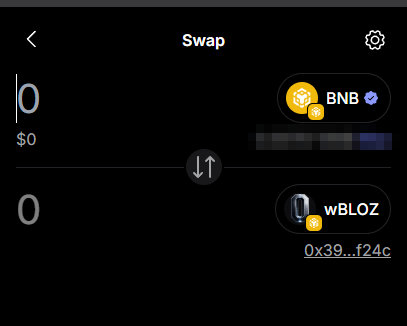
    As the target token, search for wBLOZ or paste the contract address from above. MetaMask shows the shortened address (0x39…f24c): it must match.

    MetaMask swap screen with BNB as the paying token and wBLOZ selected with contract 0x39…f24c
  4. 4

    Enter a small amount and review

    Enter a small test amount first. Look at the price impact and slippage settings. With little liquidity both can be high. If the numbers look wrong, do not swap.

  5. 5

    Confirm the swap

    Confirm in MetaMask. After a few seconds wBLOZ appears in your wallet (add the token with the contract address if it is not shown). You can follow the trade on GeckoTerminal or the CoinMarketCap DEX page.

  6. 6

    Other ways

    You can also swap on PancakeSwap, or wrap native BLOZ on the bridge. Or mine native BLOZ with your wallet.

Screenshots show the MetaMask app; balances are blurred. Menus can look different in your version.

// AVOID FAKES

Fake tokens and scams

  • There is one official wBLOZ contract: 0x395B11E87ac0630aF9DC32520f411dB17C13F24C. Any other address with a similar name is not ours.
  • Do not trust search results or tokens that appear in your wallet without you adding them. Use the links on this page.
  • Nobody from the project will ask for your seed phrase or private key, or send you a link to “claim” tokens. Never share them.
  • Prices, liquidity and data on third-party sites (GeckoTerminal, CoinMarketCap, PancakeSwap, MetaMask) are not controlled by us, and we have no partnership with or endorsement from them and can be delayed or wrong.
  • This is not investment advice. wBLOZ is experimental, can lose all its value, and you only use money you can afford to lose.